
Each BIP includes a Behavior Overview — a clinical data form that records the learner's target behavior, behavior function, baseline data, and measurable goals. This information forms the foundation of the plan and is displayed in Present Mode.
To access and edit background information:
From inside the BIP editor, click the Behavior Overview button in the top-right toolbar.
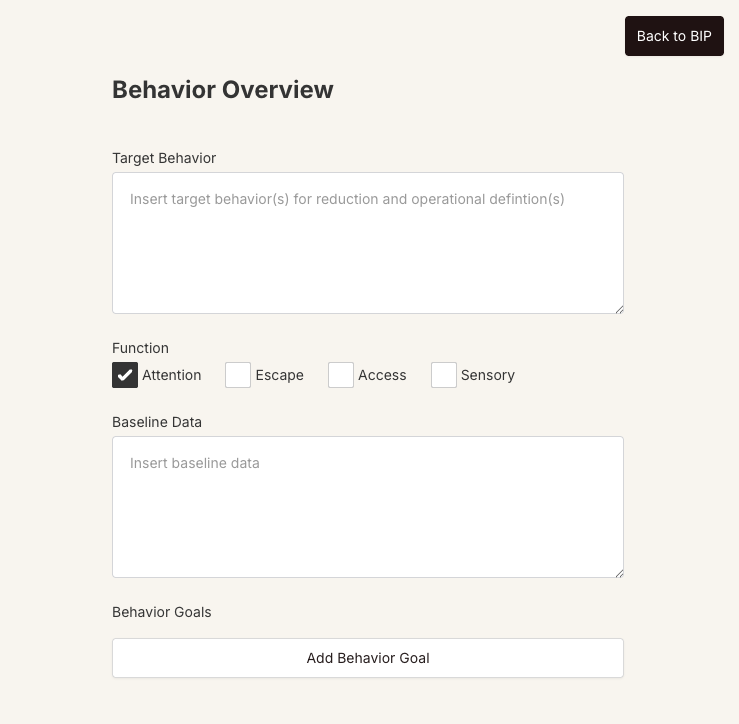
The Behavior Overview page opens with the following fields:
Target Behavior — enter an operational definition of the behavior(s) being addressed.
Function — check one or more boxes: Attention, Escape, Access, or Sensory.
Baseline Data — document pre-intervention frequency, duration, intensity, or other measurement data.
Behavior Goals — click Add Behavior Goal to add one or more measurable goals, each with a name and description.
All changes save automatically as you type.
Click Back to BIP (top-right corner) when finished to return to the canvas.
You can also edit the "When team should prioritize support" field directly on the BIP canvas — it appears just below the BIP title and describes the key contexts for implementing the plan (e.g., "During transitions, when non-preferred tasks are assigned").
